UX DESIGN
Redesigning the Hotel Booking Experience
ROLE
UX Designer
EXPERTISE
UX Design
YEAR
2024


Project Overview
Improving the hotel search and booking experience by identifying usability issues in existing booking platforms and designing a more intuitive booking flow.
Tools
Figma, FigJam, Miro, Google Forms, Zoom, Magic Patterns, NotebookLM
Booking hotels online should be simple, but many users experience friction when searching, comparing, and selecting accommodation.
Research revealed several key challenges:
• Users struggle to compare hotels efficiently
• Filtering options are often overwhelming or unclear
• Important information such as cancellation policies or included amenities is difficult to find
• Booking flows often require too many steps with confusing navigation
These issues can lead to user frustration and booking abandonment.
Design challenge
How might we design a hotel booking experience that helps users quickly find and confidently book the right accommodation?
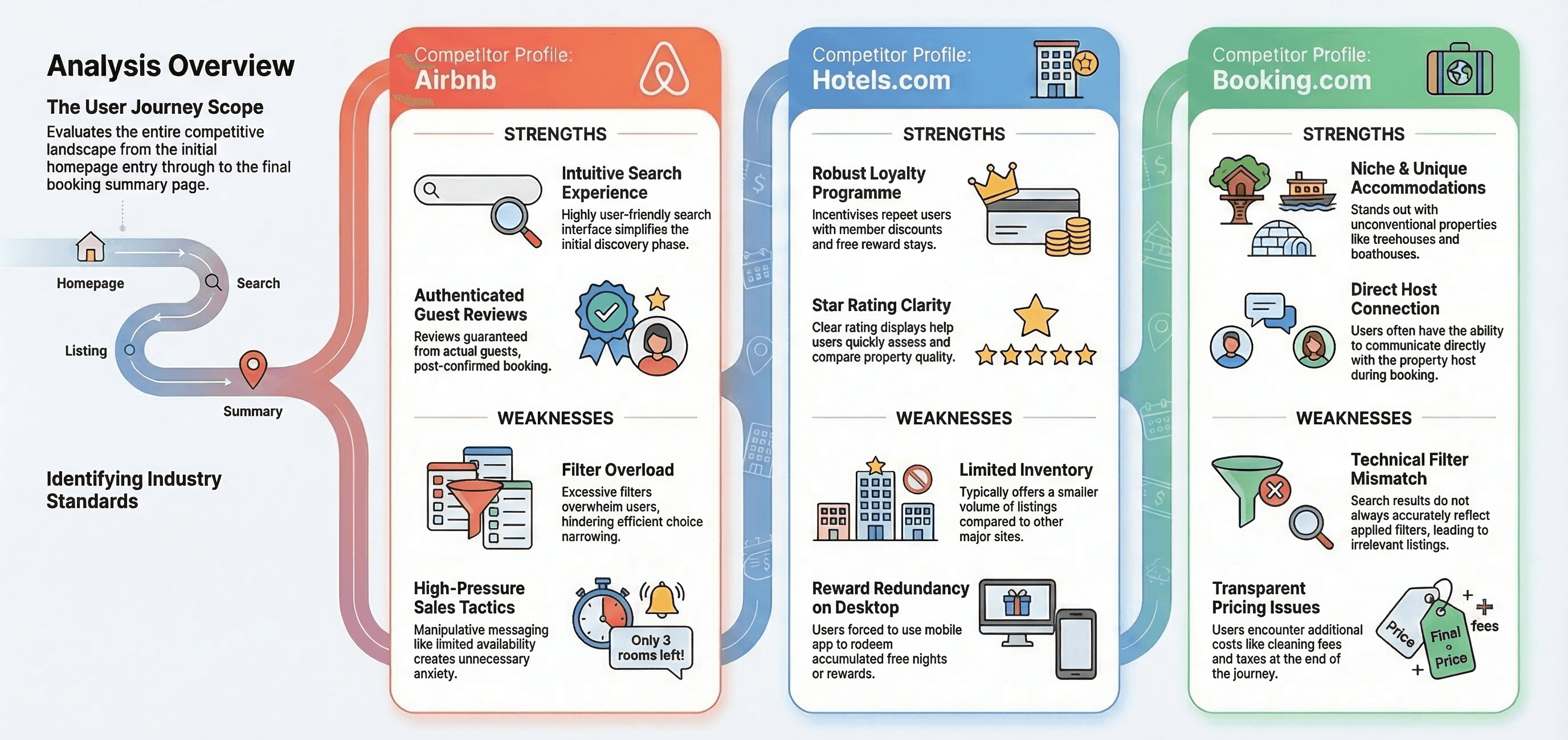
Analysing competitors provided valuable insights into industry standards and opportunities for improvement in the hotel booking process. I conducted a competitive analysis of three hotel booking websites, Booking.com, Hotels.com, and Airbnb.com, to gather insights for designing my own website. The primary objective was to understand the competitive landscape and identify potential user challenges throughout the booking process. My analysis focused on the journey from the homepage to the booking summary.
A total of 50 participants were surveyed on their experience of booking hotels to gather research data, both qualitative and quantitative, in an aim to understand potential hotel booking issues and identify improvement opportunities.
Usability Testing
To better understand how users interact with hotel booking platforms, I conducted a moderated usability test alongside analysing two usability tests provided by the UX Design Institute.
In total, three usability tests were reviewed:
• Two tests conducted by the UX Design Institute on Barceló Hotels and The Doyle Collection
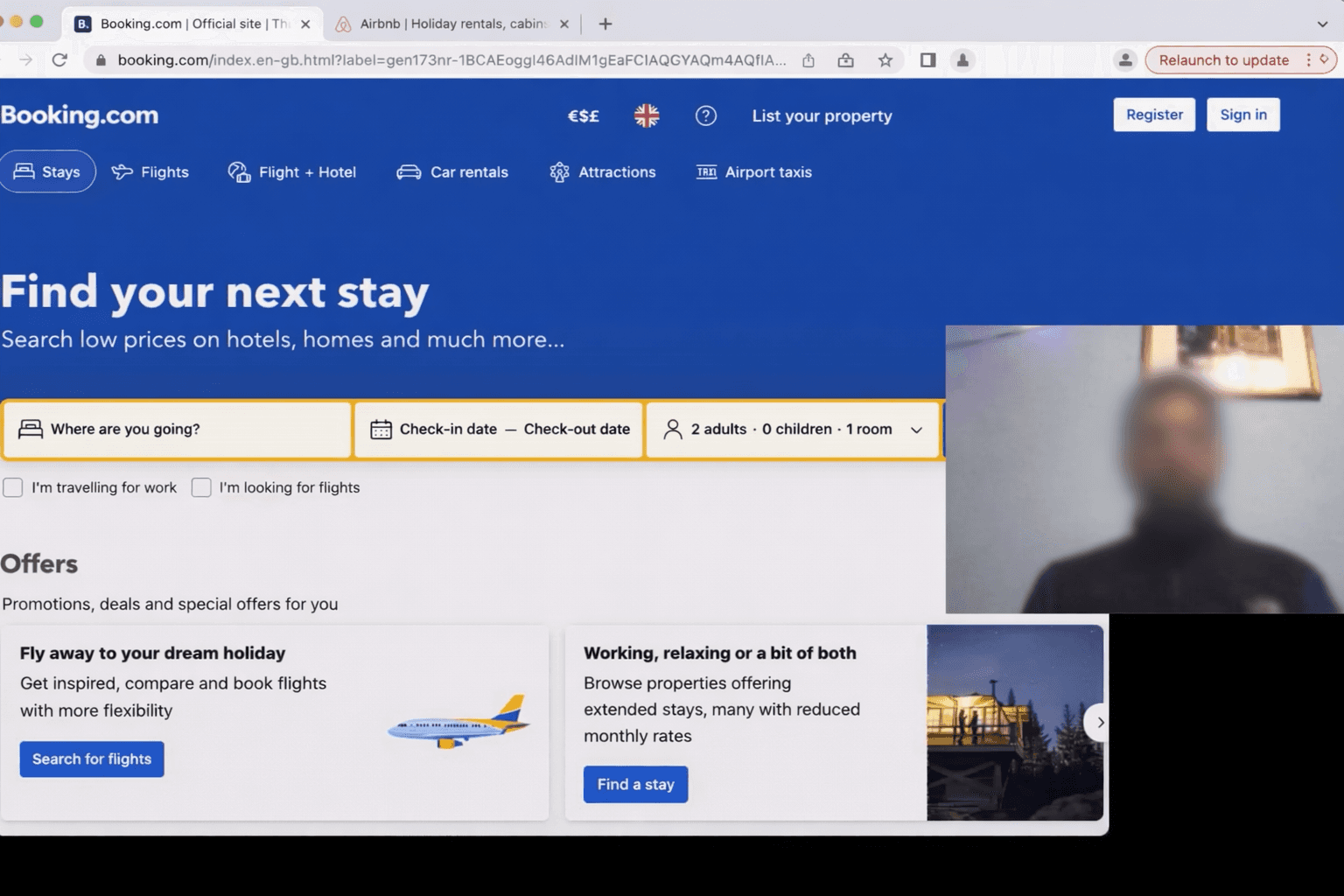
• One test conducted by me on Booking.com and Airbnb
All sessions were conducted remotely via Zoom and recorded for analysis.
For my usability test I recruited a participant and asked them to complete common hotel booking tasks, allowing me to observe their behaviour, decision-making and frustrations throughout the process.
The session followed a structured script, guiding the participant through tasks such as:
• Searching for a hotel in a specific location
• Comparing different accommodation options
• Reviewing room details and amenities
• Attempting to complete the booking process
Analysis
After this I reviewed all the research gathered and created an affinity diagram using Miro to represent what had been learnt so far. The notes were all in relation to the current user experience: goals, behaviours, pain points, mental models, and contextual information. By the end of my affinity diagram session, I had clear groupings that summarised the key themes from my research. This information was valuable for helping me design for the user
Design
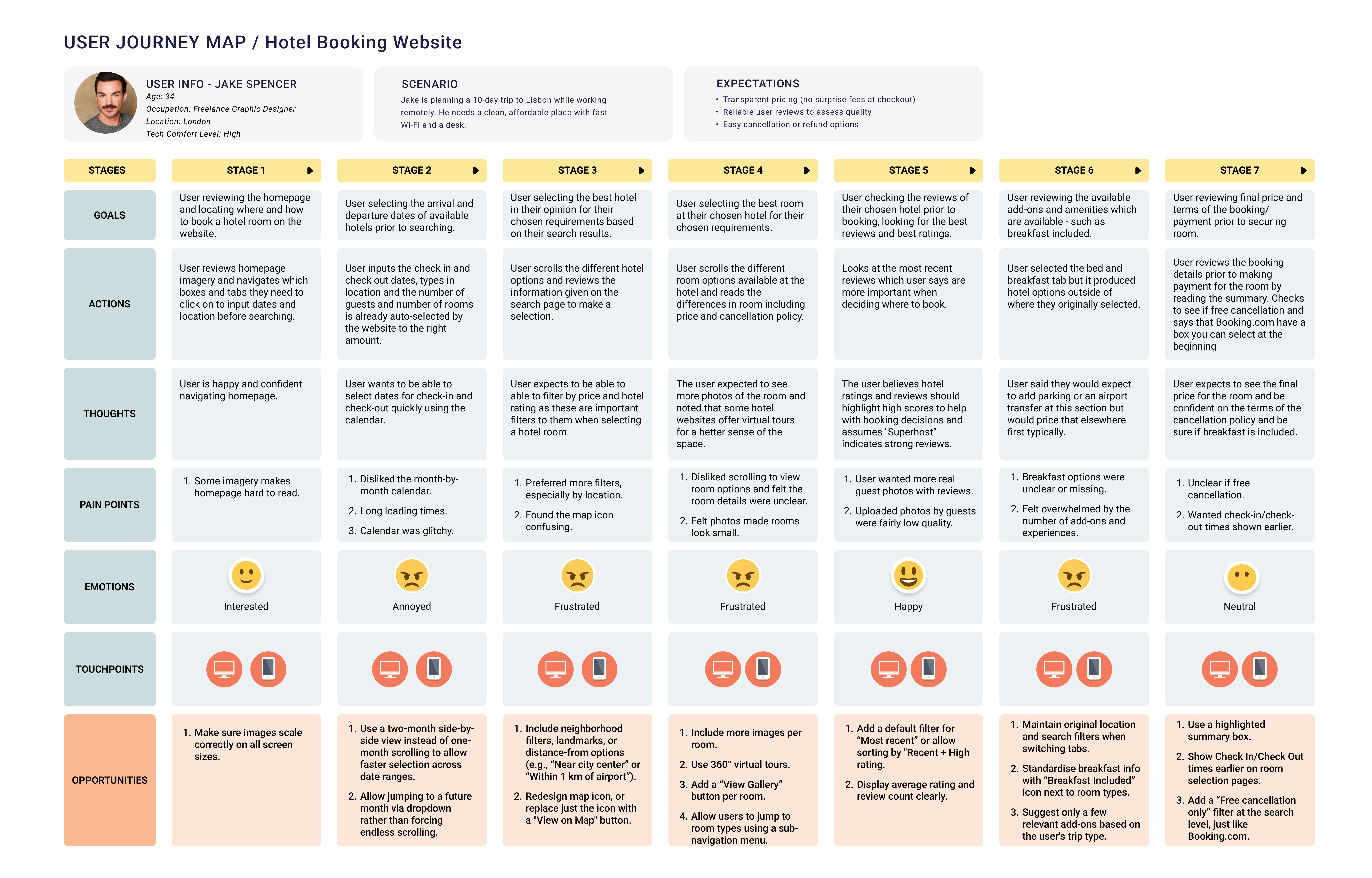
For the next part of my project, I put more structure on my research by making a customer journey map in Figma to paint an overall picture of the most common user experience, highlighting the problems and the positives. This incorporated the research data taken from all of the previous projects. Along the vertical axis, I included:
Positives
Pain points
Mental models
Behaviours
Goals
The emotional graph and user quotes help the reader to jump into the user's shoes and understand where the experience is lacking at a glance. By doing this I tried to identify the most common experience, based on all the information I had gathered.
Following this I then took the customer journey map and affinity diagram I developed in the previous projects and attempted to start to solve the problem by reviewing the issues the users uncovered. I then sketched out the ideal user flow, focusing on the most common use case, from the homepage to the booking summary screen. I then used Figma to design the flow digitally capturing every user interaction and screen state in the flow.
After identifying the key issues to be solved in my customer journey map and defining the flow, I then produced sketches of the screens for the booking process and created a list of the screens to be designed from homepage up to the booking summary.
I then created a medium-fidelity prototype from my desktop website to simulate the experience of a working website. I reviewed my flow diagram and screen sketches and designed wireframes for each screen in Figma, then linked those screens together to make the prototype interactive. I was not sure which screen size to use as a starting point for a desktop website and chose the MacBook Air model. During the prototyping process I then discovered that I was limiting myself on my ‘Search Results’ page due to my design and therefore was only able to showcase one potential hotel in my search results.
2026 Update — Design Iteration
After completing the initial prototype in 2024, I revisited the project to refine the visual design and bring it in line with current UI standards.
While the original prototype focused on usability and structure, the interface felt visually basic and lacked the level of polish expected from modern booking platforms.
To address this, I used AI-assisted design tools (Magic Patterns) to rapidly explore improved layouts and UI patterns.

What I Improved
Improved Hierarchy
To make key actions (search, filters, booking) more prominent
Modern Layout
Cleaner layout aligned with current design standards and better use of spacing and typography to reduce cognitive load
Stronger Visuals
More visually engaging components for hotel listings and details with enhanced consistency across screens
This iteration allowed me to:
• Apply what I’ve learned since completing the project
• Bring the design closer to real-world product standards
• Explore how AI tools can support and not replace: design thinking
Rather than starting from scratch, I treated this as an opportunity to iterate and improve, reflecting how design evolves in real product environments.